
Cloud storage has become a practical solution for individuals and small teams who need reliable ways to keep files safe, accessible, and organized. Instead of relying solely on a computer’s hard drive or external devices, cloud storage places data on remote servers managed by specialized providers. Users reach those files through an internet connection, making information available from almost any device. For beginners, understanding how the system works, its main advantages, and simple protective habits builds confidence and reduces the risk of data loss.
What Cloud Storage Is and How It Works
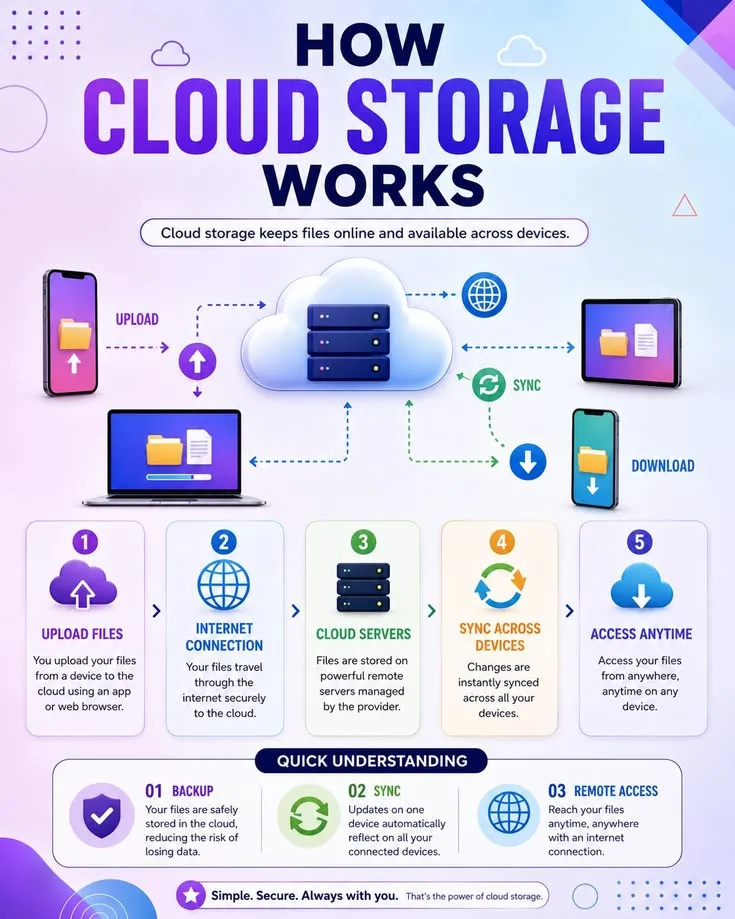
Cloud storage is a service that saves digital files—documents, photos, videos, and other data—on servers located in off-site data centers rather than on a personal device. When a file is uploaded, the provider typically divides the information, stores copies across multiple servers or locations, and makes the complete file available again whenever it is requested. Access occurs through a web browser, desktop application, or mobile app that communicates with the provider’s systems.
This design creates redundancy. If one server experiences a problem, other copies remain available. Providers handle the physical hardware, maintenance, power, and cooling, so users do not need to manage those technical details themselves. The result is a flexible system that expands or contracts according to the amount of data stored.
Key Benefits for Everyday Users
One of the strongest advantages is accessibility. Files stored in the cloud can be opened from a laptop at home, a phone while traveling, or a tablet in another location, as long as an internet connection exists. This removes the need to carry physical drives or email large attachments.
Scalability is another practical benefit. Traditional local storage has fixed limits. Cloud services allow users to increase capacity when needed and often reduce it later, paying mainly for the space actually used. This pay-as-you-go model avoids large upfront hardware purchases and the ongoing costs of maintaining personal servers or multiple external drives.
Collaboration becomes simpler as well. Multiple people can view or edit the same document without creating conflicting versions. Shared folders and controlled permissions let users decide exactly who can see or change each file. Automatic versioning in many services also helps recover earlier copies if something is overwritten by mistake.
Reliability improves through built-in redundancy and backup features. Providers distribute data across geographically separate facilities, protecting against local hardware failure, power outages, or physical damage that could affect a single computer or office. Many services also offer recovery tools for accidentally deleted items.
Finally, the reduction in hardware management frees time and attention. Users no longer need to monitor drive health, replace failed disks, or worry about running out of space on a single device.
Understanding the Trade-Offs
Cloud storage depends on an internet connection for full access. Offline availability exists in many apps through selective syncing, yet the most current versions require connectivity. Security and privacy also require attention. While reputable providers implement strong technical safeguards, users remain responsible for account protection and careful sharing decisions. Cost can grow if large volumes of data accumulate without regular review, so monitoring usage helps keep expenses predictable.
Best Practices for Secure and Effective Use
Strong account security forms the first line of defense. Choose a unique, complex password and enable multi-factor authentication whenever it is offered. This extra step makes unauthorized access far more difficult even if a password is compromised.
Encryption protects data both while it travels and while it rests on servers. Most major services encrypt information in transit and at rest. For highly sensitive files, additional client-side encryption—where files are encrypted on the user’s device before upload—provides an extra layer of control.
Regularly review sharing settings and permissions. Shared links should be set to expire when possible, and access should be limited to the minimum necessary people. Avoid public links for private material.
Maintain independent backups of important files. A widely recommended approach is to keep copies in different forms and locations: the original on a primary device, a cloud copy, and an additional local or offline copy. This strategy protects against account issues, accidental deletion, or rare service disruptions.
Organize files with clear folder structures and consistent naming. Good organization makes retrieval faster and reduces the chance of uploading duplicate or outdated versions. Periodically review stored content and remove items that are no longer needed to control costs and clutter.
Keep applications and devices updated. Software updates often include security improvements that protect the connection between personal devices and cloud services.
Choose a reputable provider that clearly explains its security practices, data locations, and recovery options. Reading the basic privacy and security information helps match the service to personal or small-business needs.
Getting Started with Confidence
Beginners can start with free tiers offered by many services to learn the interface and features before committing to paid plans. Upload a small set of non-critical files first, practice sharing and recovering versions, and gradually move more important data once comfortable with the controls.
Cloud storage works best as part of a broader data habit rather than a complete replacement for local copies of irreplaceable items. When combined with sensible security steps and occasional reviews, it provides convenient access, automatic protection against many common forms of loss, and room to grow without constant hardware upgrades.
By understanding the underlying model, recognizing the clear benefits, and applying straightforward protective practices, beginners can use cloud storage effectively and safely. The technology removes many traditional limitations of physical media while placing useful control back in the user’s hands through careful account management and thoughtful organization.
Read more – wasatchglobal.com
